


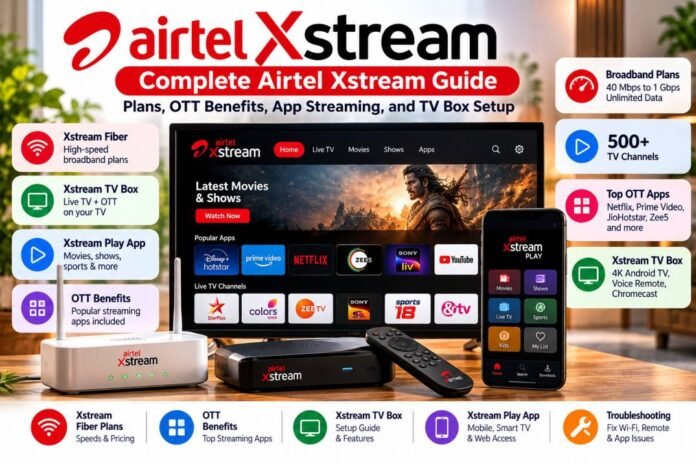

Want to watch movies, web series, live TV, and sports without switching between several apps? Airtel Xstream brings broadband, television, and online streaming into one entertainment service.
You can use Airtel Xstream Fiber for home internet, Airtel Xstream Play for OTT content, or the Xstream TV Box to turn a compatible television into a smart TV.
But which Airtel Xstream plan should you choose? What OTT apps come with the subscription? And how do you set up the TV box?
This guide explains Airtel Xstream plans, current broadband prices, OTT benefits, app access, TV box setup, and common fixes.
What Is Airtel Xstream? (Ecosystem Overview)
Airtel Xstream is an entertainment ecosystem built around broadband, television, and streaming.
It includes three main services:
- Airtel Xstream Fiber: Home broadband with different speed and entertainment plans.
- Airtel Xstream Play: An OTT platform that brings content from several streaming services into one app.
- Airtel Xstream TV Box: A set-top box that supports TV channels, streaming apps, voice search, and Chromecast.
These services work together, but they aren’t the same product. Your broadband plan, TV subscription, and streaming benefits depend on the package you choose.
The Airtel Xstream Ecosystem: Fiber, Android TV Box, and OTT Play
Airtel Xstream Fiber connects your home to the internet. You can use it for online classes, video calls, downloads, gaming, and streaming.
The Xstream TV Box adds smart TV features to a compatible television. Airtel lists 500+ TV channels, access to 5,000+ apps through Google Play, built-in Chromecast, and a voice-enabled remote.
Xstream Play brings content from multiple OTT services into one place. Depending on your subscription, you may get access to films, series, regional shows, and live sports.
You don’t need every product to use every feature. For example, you can subscribe to Xstream Play for supported devices without buying the Xstream TV Box.
Airtel Xstream App and Web Play Access
You can access Airtel Xstream Play through its official website or the mobile app.
The service supports phones, tablets, computers, smart TVs, and compatible streaming devices. Its catalogue includes content from several partner platforms, with access based on your plan.
To get started:
- Install Airtel Xstream Play from your device’s app store, or open the official website.
- Sign in using the supported Airtel account or mobile number.
- Check your active subscription or available benefits.
- Browse films, shows, sports, or content by language.
- Select a title and start streaming.
Some services require you to claim a benefit through the Airtel app before watching. A few titles may open in the partner app. Follow the sign-in instructions shown on your screen.
Airtel Xstream Plans and Pricing: Fiber and Broadband
Airtel offers broadband plans at different speeds and prices. Some plans focus on internet access; others add TV channels and OTT subscriptions.
The table below reflects Airtel’s published broadband listings. These are monthly prices before GST. Some packages appear only in selected areas. Check the official Airtel broadband plans page before ordering.
Airtel Xstream Fiber Broadband Plans Breakdown
| Monthly Price | Advertised Speed | TV Benefits | Other Benefits |
| ₹499 | Up to 40 Mbps | Not included | Xstream Play and other eligible benefits |
| ₹599* | Up to 30 Mbps | 350+ channels | OTT bundle and other benefits |
| ₹699* | Up to 40 Mbps | 350+ channels | OTT bundle and other benefits |
| ₹799 | Up to 100 Mbps | Not included | Selected digital benefits |
| ₹899 | Up to 100 Mbps | 350+ channels | OTT bundle and other benefits |
| ₹999 | Up to 100 Mbps | Not included | Netflix, Prime Video, Apple TV+, JioHotstar, ZEE5 and more |
| ₹1,199 | Up to 100 Mbps | 350+ channels | OTT bundle and other benefits |
| ₹1,599 | Up to 300 Mbps | 350+ channels | OTT bundle and other benefits |
| ₹3,999 | Up to 1 Gbps | 350+ channels | Premium OTT bundle |
<text color=”secondary” size=”sm”>*The ₹599 and ₹699 packages are listed for selected locations. Plan benefits and partner apps can change. GST is extra. Confirm your exact package and any installation charges with Airtel before payment.</text>
Airtel describes its broadband data as unlimited, subject to its applicable fair usage policy. Check the terms of your chosen package if you plan heavy downloads or continuous streaming.
Best Airtel Xstream Plans With Free OTT Bundles
The best Airtel Xstream plan depends on how you use your connection.
For basic browsing: The ₹499 plan offers up to 40 Mbps. It can suit light browsing, online classes, and streaming on a few devices.
For a small family: A 100 Mbps plan is a useful starting point for several phones, video calls, and HD streaming.
For OTT viewers: The ₹999 plan lists popular services such as Netflix, Amazon Prime, Apple TV+, JioHotstar, and ZEE5. Check the exact subscription tier and activation terms before choosing it.
For a home with TV and streaming needs: Plans from ₹899 and above may combine broadband, TV channels, and OTT benefits, depending on the location and package.
For heavy use: The ₹1,599 plan offers up to 300 Mbps, and the ₹3,999 plan offers up to 1 Gbps. These higher speeds may help large households with many connected devices, large downloads, and high-resolution streaming.
Don’t pay for speed you won’t use. Compare your device count, streaming habits, and the actual OTT benefits before choosing a plan.
Airtel Xstream OTT Benefits and Channel List
Airtel Xstream Play brings content from different streaming partners into a single service. It offers movies, series, regional shows, and sports content across supported devices.
The exact OTT list depends on the subscription or broadband plan. Airtel lists more than 20 OTT partners on its Xstream Play offering, with access to services such as SonyLIV, Lionsgate Play, Sun NXT, Hoichoi, Chaupal, FanCode, ManoramaMax, ShemarooMe, and others.
Included OTT Apps on Airtel Xstream Play
Here are examples of streaming services that may be available through Airtel’s bundles:
| Platform | Type of Content |
| SonyLIV | Shows, films, and sports |
| Lionsgate Play | International films and series |
| Sun NXT | Regional films and shows |
| Hoichoi | Bengali films and series |
| ManoramaMax | Malayalam content |
| ShemarooMe | Indian films and entertainment |
| FanCode | Selected sports coverage |
| Chaupal | Regional-language entertainment |
| ZEE5 | Films, shows, and original content |
| JioHotstar | Movies, shows, and sports on eligible plans |
| Amazon Prime Video | Films and series on eligible plans |
| Netflix | Films and series on eligible plans |
This is not a promise that every app is included with every subscription. Some platforms require an eligible plan or a benefit claim through the Airtel app. Premium subscriptions may have their own account, device, and viewing limits.
Live TV Channels and Multi-Screen Streaming Benefits
Airtel offers TV channels through eligible broadband and DTH packages. Its Xstream TV Box page lists more than 500 TV channels, while certain broadband bundles advertise 350+ channels. The channel count depends on the product and pack.
The difference matters:
- Live TV provides scheduled television channels.
- OTT streaming lets you choose films and shows on demand.
- Xstream Play brings content from supported streaming partners together.
- The TV Box adds Android TV apps and DTH functions to your television.
Xstream Play supports multiscreen use under eligible subscriptions. The number of simultaneous streams can vary by partner service and plan, so check the terms if your family watches on several screens at once.
Airtel Xstream Box and App Setup Guide
The Airtel Xstream TV Box combines traditional DTH features with smart TV functions. Airtel’s current online product page lists the box at ₹2,899, though eligible offers or installation arrangements may differ. Check the official Xstream TV Box page for the current price.
How to Install and Activate the Airtel Xstream Android TV Box
Before setup, keep the box, power adapter, HDMI cable, remote, and Wi-Fi details ready.
- Connect the box to your TV with the HDMI cable.
- Plug in the power adapter and switch on the TV.
- Select the HDMI input connected to the box.
- Follow the on-screen instructions to pair the remote.
- Connect the box to your home Wi-Fi network, or use a supported wired connection if available.
- Sign in with your Google account when prompted. This allows access to Google Play and related features.
- Complete any Airtel activation steps and check your DTH subscription.
- Open Xstream Play or another supported streaming app to test playback.
The box supports 4K output on compatible equipment and includes built-in Chromecast and voice search. Actual picture quality depends on your television, the content, and your internet connection.
An active DTH subscription is required to continue using the box’s online content features under Airtel’s published terms.
Downloading and Using the Xstream Play App on Mobile and Smart TVs
To use Xstream Play on a phone:
- Open Google Play or the Apple App Store.
- Search for Airtel Xstream Play and install the official app.
- Open the app and sign in using the supported Airtel account or mobile number.
- Check your eligible subscriptions and claim any available benefit.
- Search for a title and start playback.
On a supported smart TV, search its app store for Airtel Xstream Play. If the app isn’t available on your TV, you may be able to use a compatible streaming device or the Xstream TV Box.
Some OTT benefits require activation from the Airtel Thanks app. If a partner asks you to pay despite having an eligible Airtel plan, check whether the benefit was claimed and whether you’re using the correct account.
Troubleshooting Common Airtel Xstream Issues
Airtel Xstream problems can come from your broadband connection, app settings, subscription status, or TV box.
Fixing Connectivity and Network Drops on Xstream Fiber
If streaming keeps buffering or your connection drops, try these steps:
- Check whether the problem affects every device or just one.
- Restart your router by switching it off, waiting about 30 seconds, then powering it on again.
- Wait for the router to reconnect fully.
- Move closer to the router and test Wi-Fi again.
- Run a speed test using Airtel’s official speed test.
- If possible, test a computer using Ethernet to compare wired and wireless speeds.
- Check the Airtel app for service updates or support options.
If the router shows a red fibre or LOS light, or the connection stays down after a restart, contact Airtel support. Don’t bend or disconnect the optical fibre cable yourself.
For weak coverage in another room, consider suitable Wi-Fi mesh equipment or a compatible booster. Router placement can make a large difference: keep it in an open, central location rather than inside a cabinet.
Troubleshooting Xstream Box Remote Pairing and App Glitches
If the remote stops responding, try these checks:
- Replace the batteries and check their direction.
- Restart the TV box and wait for the home screen.
- Follow the on-screen instructions to pair the remote again.
- Check that the TV is set to the correct HDMI input.
- Confirm that the box has an active internet connection.
- Update the app or restart it if playback fails.
- Sign out and sign in again if your account benefits don’t appear.
If only one OTT app fails, test another app. This can help separate a streaming-service issue from a box or network problem.
For repeated error codes, note the code and the app or screen where it appears. Check Airtel’s Xstream support and FAQs or contact support with those details.
Final Thoughts: Which Airtel Xstream Option Should You Choose?
Airtel Xstream can combine broadband, television, and OTT streaming, but the right setup depends on your needs.
Choose Xstream Fiber for home internet. Pick Xstream Play if you want a single place to discover supported streaming content. Consider the Xstream TV Box if you want Android TV apps, voice search, Chromecast, and DTH channels on your television.
Before paying, compare broadband speed, GST, installation terms, OTT subscription tiers, channel packs, and the benefits you must claim. These details can vary by location and offer.
Start with the official Airtel broadband plans, Xstream Play website, and Xstream TV Box page to confirm the latest options.
A clear comparison before signup can help you get the speed and entertainment features you need without paying for extras you won’t use.
Add a quick plan comparison tableClarify OTT benefit activation steps